Showing posts with label # news. Show all posts

Thursday, 23 March 2017

LG G6 REVIEW IN PROGRESS: THIS IS THE LG PHONE WE WANTED TO SEE

LG G6 REVIEW IN PROGRESS: THIS IS THE LG PHONE WE WANTED TO SEE

KEY FEATURES

  • 18:9 quad-HD display
  • HDR10 and Dolby Vision
  • Android 7.0
  • 2 x 13-megapixel rear cameras
  • Very thin bezel
  • Snapdragon 821, 4GB RAM
  • 32GB storage, microSD
  • 3,300mAh battery, USB-C
  • Wireless charging (US-only)
  • Quad-DAC (Korea-only)
  • Dual-SIM (select Eastern European countries)
  • Manufacturer: LG
  • Review Price: to be confirmed
• LG G6 Release Date: March 2017 (Korea) April 2017 (US, UK and Europe)

• LG G6 Price: £/$TBA


WHAT IS THE LG G6?

LG’s flagship phones have, for the last few years, pinned their success on standout features. The LG G3 introduced quad-HD displays, the G4 shipped with quirky leather backs, and last year’s G5 went with a modular design. For the G6, LG is focusing on cramming a large display in a small body.
And from my first impressions, it appears that the LG G6 is likely to be far more successful than those failed modules.
The first thing you’ll notice about the LG G6 is its peculiar display. Like the Xiaomi Mi Mix – a China-only phone released in late 2016 – the screen is stretched to nearly every corner of the device.
0:00
/
3:20
 

LG G6 – DISPLAY

Rather than the typical 16:9 aspect ratio seen on almost every other smartphone, LG opts for an 18:9 ratio display (basically 2:1) that provides a taller display in a smaller body.
The 5.7-inch display – a sizeable increase from the 5.2-inch panel of the G5 – sits inside a shell that's barely bigger than its predecessor and noticeably smaller than the 5.5-inch iPhone 7 Plus and Samsung Galaxy S7 Edge.
One side effect of cramming a bigger screen into a shell of this size is that the corners of the panel are now rounded, rather than right angles. While a little odd at first, but I quickly became used to it. It matches the overall curviness of the phone; but it looks best on the black model. On my white review unit, the black border between the panel and bezel is fairly prominent, and the corner curves aren’t perfectly circular. It’s a small issue, but once you've noticed it, it’s hard to forget.
To match the stretched display, the resolution here sits at 2,880 x 1,440 – and it’s a lovely panel. Even though it isn't AMOLED, it delivers vivid colours and deep blacks. It’s the first phone with Dolby Vision support and, like the dearly departed Note 7, it’s HDR10-enabled too.
Blacks aren’t quite as deep as AMOLED panels, though – and with LG’s huge AMOLED business, it seems odd for the company not to utilise its expertise here. Being an IPS LCD also stops it from being compatible with Google’s Daydream VR platform, something that I enjoy immensely on the Pixel.
cheese 41

There were a few demo HDR (high dynamic range) videos on my review sample; content looked noticeably brighter and darker scenes were more detailed too. LG says that HDR content from Amazon and Netflix will work, but it will follow an app update. LG hasn’t said when they'll be available, but I'll update this article when I know more.
Remember when Apple switched the iPhone from a 4-inch to a 5-inch screen? It led to months (maybe years) of apps not fitting the display properly; many required thick black bars at the top and bottom to work. Something similar is happening here, but not to quite the same level of annoyance.
For instance, videos from YouTube, which are almost universally 16:9, have black bars on either side. Media from Amazon’s Prime app has one large bar at the bottom. Some software trickery lets you stretch video in certain apps – Netflix, for example – so films take up most of the screen.
Related: What is HDR?
Regular apps are fine, thanks to Android’s native rescaling features, but games will either need to be updated or played with black bars at the bottom. It’s annoying, but not too distracting. The software layer used for videos is present here, so you can stretch games out to fill the entire screen. It works well, and in titles such as Alto’s Adventure or Horizon Chase, I didn't notice the difference.
All of LG’s own apps have been updated; and since the aspect ratio is 2:1, the design theme for the UI is two squares on top of each other. This helps Android 7’s native split-screen multi-tasking, providing more space for each app.
LG’s UI design is far from the best, though. It's a little like iOS mashed with Huawei’s EMUI, with a dash of TouchWiz thrown in. It does have the Google Assistant, though – the first phone to do so aside from the Pixel.
cheese 33

The software does have some nice little additions that make up for the less than amazing design. A swipe down on the homescreen brings up a search that can look inside apps, and the lack of an app drawer is something I actually really like.

LG G6 – DESIGN

For the first time I can remember, LG has crafted a phone that looks "nice". The lack of a thick bezel instantly draws the eye, and LG has also ditched that horrid metal-sprayed plastic that caused so much controversy on the G5.
There’s a slab of Gorillas Glass 5 on the rear (interestingly, it’s only Gorilla Glass 3 on the front), and a metal rim running around the sides, which LG claims adds some much-needed rigidity that's lost with the unorthodox screen.
The standby switch, with a fingerprint pad tucked inside, can still be found on the rear of the handset. However, unlike many phones that use capacitive pads, this switch actually depresses and offers decent feedback. Just below the camera is the perfect place for a fingerprint sensor, simply because it’s where my finger naturally rests when I pick up a phone. A major concern I have with the rumoured Samsung Galaxy S8 is the strange placement of the fingerprint scanner, beneath the glass and thereby eliminating the Home button entirely.
My biggest issue with the fingerprint scanner on the LG G6 is actually its speed and sensitivity. Since it’s basically flush to the rear, accidental touches are an issue. Even when the handset is in my pocket, it seems to randomly think I'm pressing the scanner when it’s brushing against my leg.
cheese 43

So the LG G6 is an attractive phone, once you get over the screen – but once it becomes more common, which I'm sure it will this year, it doesn't feature much else to help it stand out from the crowd.
The black, white and silvery-blue colours lack imagination, and the glass-backed design with metal sides has become almost cliché. You’ll find it on everything from budget Honor and Alcatel phones to higher-end devices.
Basically, it looks great from the front but a little dull elsewhere.

LG G6 – PERFORMANCE

Considering my review unit is a pre-production unit, I'll benchmark the G6's performance in more detail once I've had a play with a European retain unit.
This handset hasn't seen the same level of improvement on the inside as the G5, but it remains a very fast phone indeed; and even on the pre-production software, I haven’t encountered any issues.
As was heavily rumoured, the LG G6 uses last year’s Snapdragon 821 CPU – looks like Samsung did snap up those initial runs of the 835 – with 4GB of RAM and 32GB of basic storage. There's a microSD slot, but I'd have much preferred to see 64GB as the starting point.
The 821 is a great processor, with plenty of oomph and good efficiency. We don’t really yet know all the benefits of the 835 in day-to-day use, but it’s still a shame not to see the latest silicon here, especially if this phone is going to retail at the same price as the Samsung Galaxy S8.
cheese 29

LG G6 – CAMERA

The cameras haven’t seen a huge improvement either, but there have been a few tweaks to the already impressive setup.
Just like the G5, the G6 has two sensors sitting next to each on the rear of the device. One is your typical camera; 13 megapixels, OIS, f/1.8 aperture; the other has a much wider field of view.
The latter offers that GoPro-like wide-angle shot that looks great. Surprisingly, LG told me that it has found that almost 50% of people tend to use just the wide-angle camera, so it’s bumped that from an 8-megapixel sensor to a 13-megapixel version.
It lacks OIS, though, and has a much narrower f/2.4 aperture, so low-light snaps won’t be quite as good. It doesn’t have auto-focus, either – but since that focal point is so wide, it shouldn’t make a difference.
LG has worked with Qualcomm to pluck some of the dual-camera smarts from the 835 CPU to implement them here in the 821. This results in a much smoother process when switching sensors, giving the feel of a single camera. It works, too, although there remains a noticeable change in colour temperature when you switch. The wider-view camera is also much worse in low light, leaving you with very noisy photos.
I’m quite impressed with the LG G6's cameras, but there are a couple of issues. While picture detail is decent, on occasion colours can look a bit drab and the dynamic range just isn’t on a par with other high-end Android phones. Pictures often lack depth – but then this can be seen with almost all smartphones when you’re coming from the Pixel.
The Pixel remains ahead of the G6, not only in terms of picture quality, but with regards to ease of use, too. I’ll cut LG some slack since this is early software – but the time it takes to open the app, focus and snap a picture are currently just too long.

pic There's plenty of detail


p Colours can look a bit drab


pic Well-lit shots look great


pp The wide-angle sensor is much better than on previous models


ppp This is a colourful low-light shot with barely any noise

Low-light images are free of noise, however, and if the light is bright you can get some really fantastic shots.
There’s a fairly standard 5-megapixel camera for selfies – and, of course, 4K video recording is supported as well.
Related: What is IP68?

LG G6 – BATTERY LIFE AND SOUND

If you live in Europe, then prepare to get annoyed. The European and UK version of the LG G6 is missing some handy features from which other folks will benefit.
There's no wireless charging – that’s exclusive to the US – and nor will Quad Hi-Fi DAC feature for improved sound quality. Sadly, the latter is available only on the Korean model. My review unit is of US origin, so has the wireless charging support and it matches the S7 for recharge speed when docked without wires.
Neither feature is vital, but they’re rare extras that would have been a decent addition. LG couldn’t offer a reason they're lacking – but, apparently, it doesn’t add any extra weight or thickness to the handset to include either of these features.
cheese 15

Also likely to annoy is the fact that the battery is no longer removable. Instead, it’s a fixed 3,300mAh cell stuck behind the glass. This is hardly a surprise, given that the removable battery had such a negative impact on the overall look of the G5. It also means the G6 is finally water-resistant – in my opinion, a far more useful feature than a swappable battery – and has the same IP68 rating as the Samsung Galaxy S7.
I’ll save my final thoughts on battery life for when I've used a retail version, since there are some notable quirks in the stamina department with my unit. Hopefully, these will ironed out, though.

INITIAL VERDICT

Ditching the modular design was the correct move by LG. It was handled poorly, miscommunicated and failed miserably. With the G6, LG has a phone that I can see being much more successful.
It has all the parts from the G5 that I liked – basically, that ace camera setup – but finally it now looks good and the near-bezel-free design is quite eye-catching. Will the 18:9 (2:1) aspect ratio catch on? I really don’t see why not, and if Samsung follows suit then I'm sure it will become the norm come 2018.
There are still a few niggles that stop me from believing the LG G6 is the "Phone of the Year" quite yet. Couldn’t it have waited for the Snapdragon 835? I know a CPU isn’t everything, but it instantly puts the G6 on the back foot. The same goes for those missing features in the European model; surely it wouldn’t have been so hard to add in wireless charging and the Quad DAC?
I believe this to be LG’s best phone in years, but with the competition improving too, it’s a tough call as to whether or not this will stand up against the upcoming iPhone 8 and Samsung Galaxy S8. Price will be a big factor, and if this comes in cheaper than those models then LG could have a winner on its hands.


#christmas offer milford mall,# new year offer milford mall, #apple, iPhone, iphonerepair, rasvindersingh, rasvinderinauckland, rasvinder, rasvinder021, auckland, hashtag, iOS, iPadPod, crackescreen, crackscreenrepair, macbookrepair, iPhone5unlock, iPhone5sunlock, iPhone6unlock, iPhone6Sunlock, #iPhone6SPlusunlock, networkunlock, IMEIunlock, VodafoneAustralia, New Zealand, iPadAir2, iPadrepair, iPadProrepair, iPadAirrepair, queenstreet, queenstreetrepair, 0211520735, 0212491313, 0211415515, 0274964242,iphone7, facebook, instagram, snapchat, jobvacancyNZ, jobvacancyAuckland, liquiddamagerepair, insurancereport, insurancedamagereport, Manukaurepair, cityrepair, techxperts, ifixyour, ifixphone, rasvinder, iphonerepairtools, LCD, iphoneparts, mobilephonerepair, #auckland, aucklanddesign, logodesign, queenstreetshopping, aucklandshopping, cbdshopping, ipadprorepair, samsungrepair, GalaxyS5repair, GalaxyS6repair, GalaxyS7repair, iPhone7release, iPhone7unlock, 0211415515, aucklanduniversity, vodafonerepair, latestmovies, warrantyrepair, sparkiPhone, indianstudents, stoleniphonecheck, blacklisted, blaclistediPhone, facebook, onlineauction, cheapiPhone, snapchat, instagrampictures, freemoney, socialmedia, googleplus, google+, googlesearch, trending, iosapps, aotea square, event cinema, imax, burger king, strabucks, cases, covers, batteries, samsung, sony, xperia, huawei, lg, htc, supa cheap, mobile repair, smartphones, computer, laptops, motherboard, screen replacement, screen damage, glass replacement, liquid damage, network lock, milford countdown, muffin break milford mall, tank milford mall,flight centre milfords mall, asb milford mall, bnz bank milford mall,countdown special offer christmas and new year,  the warehouse milford mall special deals christmas, Dreaming of christmas milford mall, spark milford mall, #shopping at copuntdown.

Wednesday, 22 March 2017

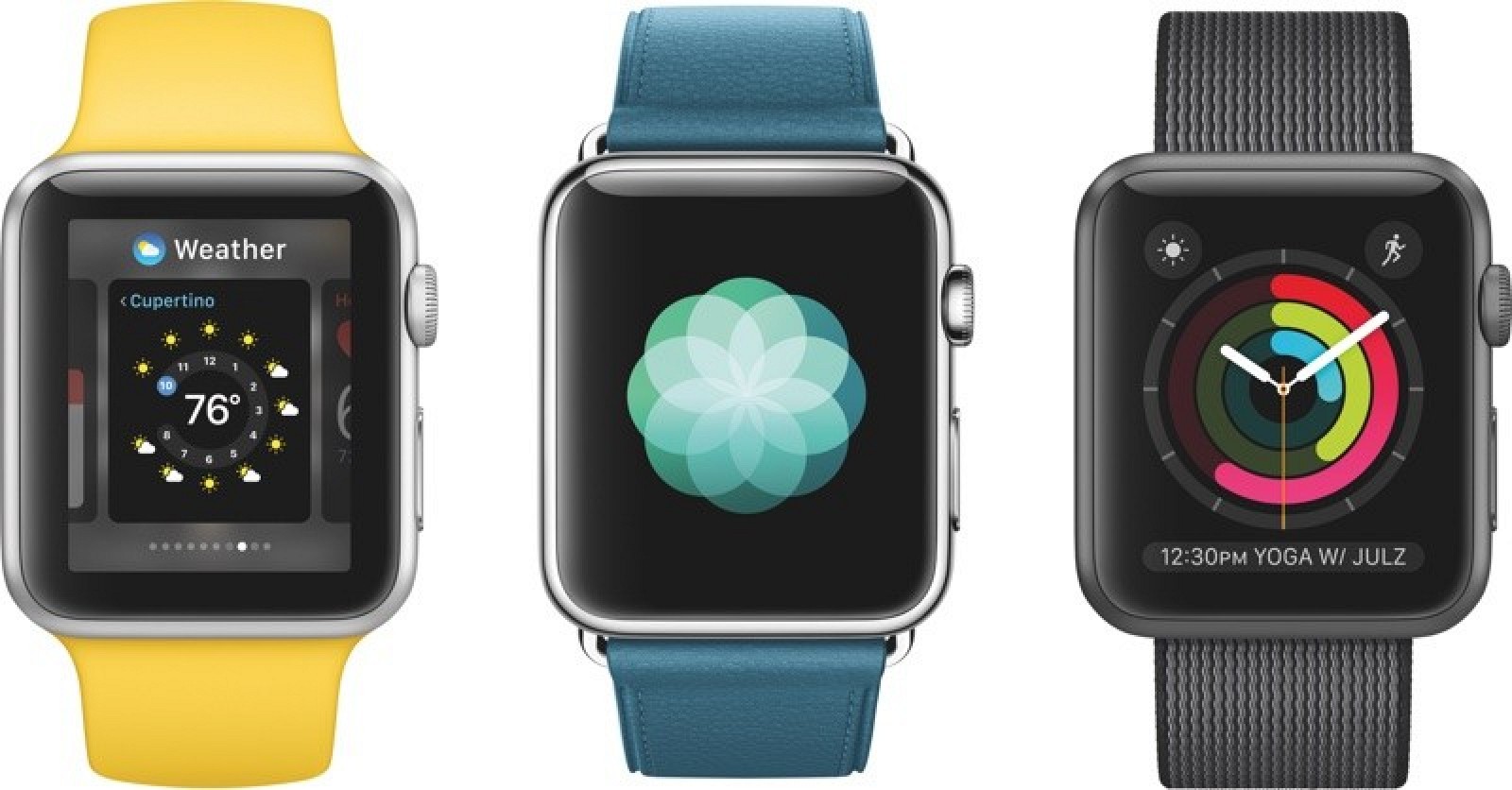
watchOS 3 The next-generation operating system for the Apple Watch launched on September 13, 2016.

watchOS 3

The next-generation operating system for the Apple Watch launched on September 13, 2016.


What's New in watchOS 3

The newest version of the watchOS operating system, watchOS 3, was introduced at the Worldwide Developers Conference on June 13, 2016 and launched to the public on September 13. watchOS 3 is a significant update to the operating system, introducing new apps, new watch faces, and impressive performance improvements. According to Apple, "it's going to feel like a whole new watch."
watchOS 3 introduces a new Dock that houses a user's favorite and recently used apps so they're easier to access. Favorite Apple Watch apps saved to the Dock are kept up to date and are able to launch instantly, cutting down on app loading times.
Navigation has been improved, with left and right swipes now used to change the watch face. A revamped Control Center with more information is available when swiping upwards on the Apple Watch screen.
Activity sharing is new in watchOS 3, allowing Apple Watch owners to share their workout and activity information with friends to compete and stay motivated. New activity-based Smart Replies in the app are available to communicate with friends and family over activity achievements.
There are settings in the Activity app to customize workouts and activities for Wheelchair users, with wheelchair pushes contributing to all-day calorie goals and "time to roll" notifications instead of "time to stand" notifications.
A Breathe app is designed to guide Apple Watch owners through daily deep breathing sessions to cut down on stress and induce relaxation, and there are also new Reminders and Find My Friends apps.
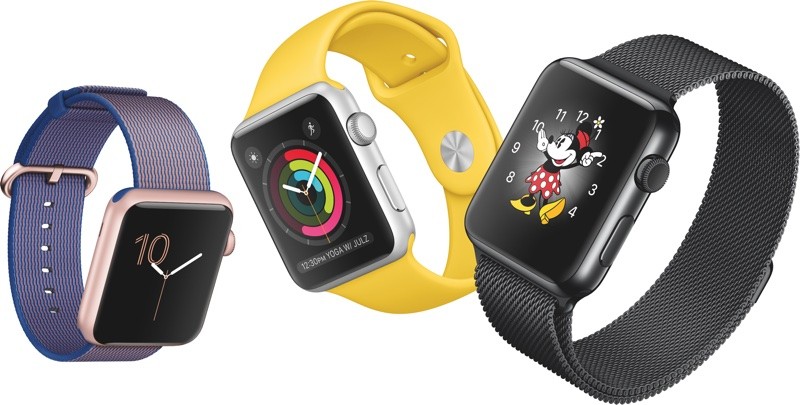
There are three new watch faces available in watchOS 3, including Minnie Mouse (able to announce the time), a simple numerical face, and an Activity face that shows activity rings. Some of the existing watch faces are also now able to work with more complications.
An SOS feature automatically calls emergency services when the side button is pressed no matter where you are in the world, and the Apple Watch can now be used to unlock a password protected Mac with new Continuity functionality.
Subscribe to the MacRumors YouTube channel for more videos.
In the Messages app, a redesign makes it quicker to reply to incoming texts, and a new "Scribble" feature allows you to write replies on the Apple Watch face with a finger.
watchosdockandbreathe
watchOS 3 was released to public on Tuesday, September 13, following several months of beta testing. It requires iOS 10 to install, which was also released on September 13.

Current Version - watchOS 3.1.3

The current version of watchOS is watchOS 3.1.3, a minor update that focuses on bug fixes and performance improvements. It replaced watchOS 3.1.1, fixing the installation issues that bricked some Apple Watch Series 2 devices. There was never a watchOS 3.1.2 update.
An upcoming watchOS 3.2 update is also in the works and seven betas have been seeded to developers so far. watchOS 3.2 includes a "Theater Mode" that's designed to let customers quickly mute the sound on their device and disable raise to wake, preventing the screen from lighting up with arm movement. Theater Mode is ideal for using when watching a movie or play, or when sleeping.
watchOS 3.2 also brings SiriKit to the Apple Watch, allowing customers to ask Siri to do things like send messages, send payments, book a ride, log a workout, make a call, search through photos, and more. SiriKit has been available on iOS devices since the release of iOS 10, but is new to the Apple Watch in watchOS 3.2.

New Watch Faces

There are three new watch faces in watchOS 3: Minnie Mouse, Activity, and Numerals.
The Minnie Mouse watch face is similar to the Mickey Mouse watch face, except it features Minnie Mouse with a customizable dress to match different Apple Watch bands. In watchOS 3, both Mickey and Minnie say the time aloud in their distinctive voices when a finger is pressed on the watch face.
watchosnewfaces
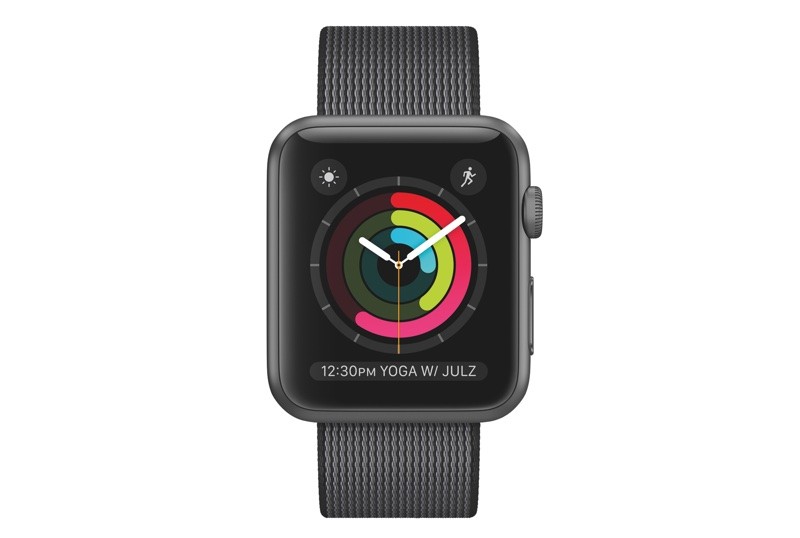
The Activity watch face shows a large view of your daily activity rings, so activity and exercise progress can be viewed at a glance. The Activity face can be set to an analog clock, a digital clock, or a chronograph, all of which show a full, clear view of the activity rings.
activityface
The final face, Numerals, is one of the simplest faces yet with a single number displayed with watch hands. The number changes and rotates around the face as time passes.
Complications:
Complications can be added to watch faces that didn't previously support them in watchOS 2, including Photo, Timelapse, Motion, and Extra Large.
XL_watch_face
There are also new complications available through new built-in apps like Breathe and Reminders, which can be added to any watch face that supports complications, and some of the existing watch include support for complications for the first time.
Face Gallery:
In the Apple Watch app for iPhone, there's a Face Gallery where you can customize watch faces with colors and complications. These tools have been previously available on the watch itself, but it can be easier to set up watch faces through the larger screen of the iPhone.

Dock and Faster App Launching

Navigation on the Apple Watch is quite a bit different in watchOS 3. The side button, in watchOS 2 to bring up a list of contacts, is being replaced with a dedicated "Dock" that brings up a list of favorite apps.
The Dock is replacing the Glances view, formerly accessed by swiping up on a watch face. The same swipe now brings up a new Control Center, a navigation change meant to mirror accessing the Control Center on the iPhone. Changing the watch face is now done by swiping left or right on the face of the Apple Watch, with a deep press no longer required, so it's much quicker to swap between faces.
In addition to these navigation changes, Apple has implemented features letting apps set as "favorites" to launch instantly. All apps designated as favorites in the new Dock are kept continually in the Apple Watch's memory, with information updated in the background. On stage, Apple said apps stored in memory this way are able to open seven times faster than a standard Apple Watch app.
applewatchdock
This allows for all favorite apps to launch "instantly," greatly cutting down on the amount of time that it takes for your most-used apps to load. The Dock houses both favorite and recently used apps, and it is customizable so you can load your frequently accessed first and third-party apps so the information you need is always at your fingertips.
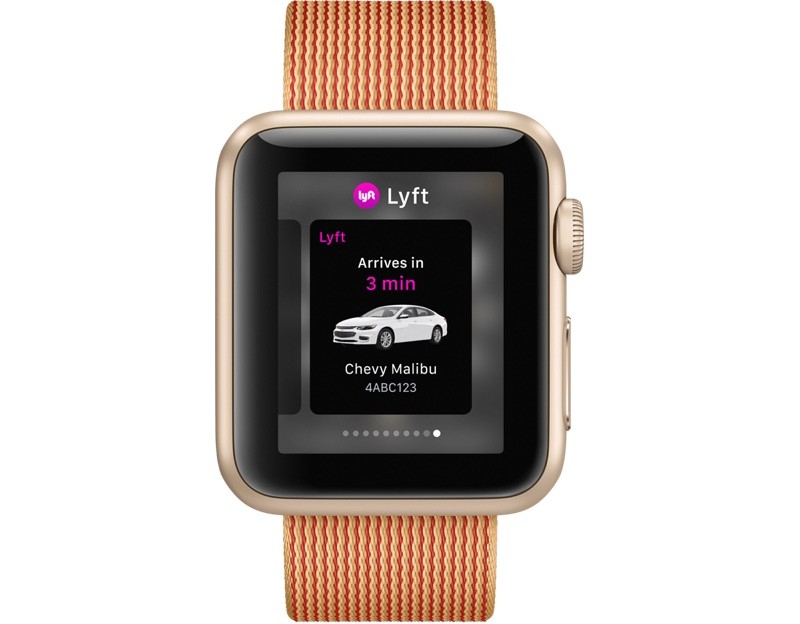
The Dock is used a lot like Glances, and when swiping left and right through apps, you can even see the full information from the app through an app snapshot without having to launch it. The Dock supports a total of 10 apps.

SOS

SOS is a feature activated by holding down the side button on the Apple Watch for three consecutive seconds. When this happens, the Apple Watch automatically calls local emergency services, using either a Wi-Fi connection or a connection to an iPhone.
SOS is able to detect your location and call the relevant number regardless of your location, so if there's an emergency on vacation and you don't know the number for emergency services, help can still be summoned because the Apple Watch knows the number to call.
After an emergency call has been placed to 911 or another local emergency service, the Apple Watch notifies your emergency contacts and provides a map of your current location. It also now supports the Medical ID, so information like age, weight, allergies, and medical conditions are readily available to emergency services personnel from the Apple Watch on your wrist.

Activity Improvements

SHARING

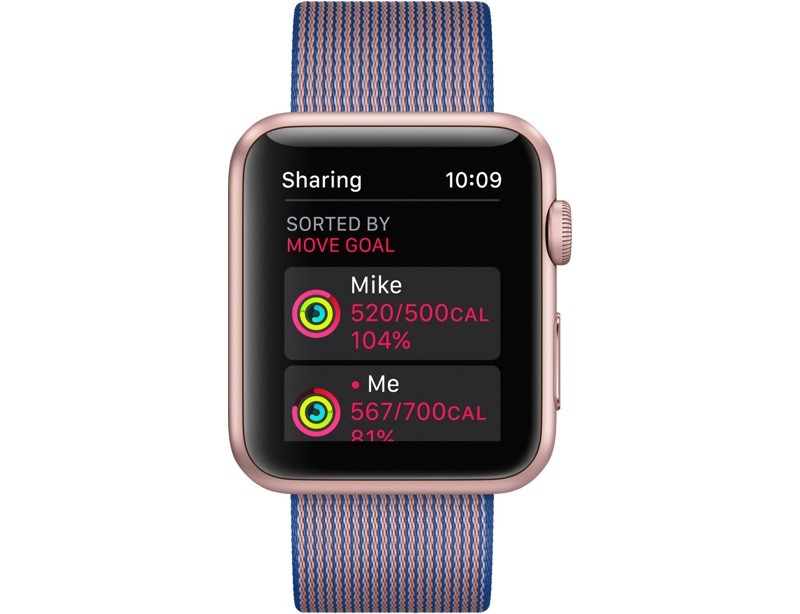
watchOS 3 supports a new "Activity Sharing" feature that lets friends and family share their activity and workout information with one another. Apple hopes Apple Watch users will be motivated to work out more through friendly competition or encouragement from friends and family.
activitysharing
Activity Sharing is accessed by swiping right on the Activity rings view of the Activity app, and in this view, the activity rings of selected friends are displayed. There are options to sort by metrics like steps, exercise minutes, and workouts, so you can see how your activities measure up to those of your friends, and there are built in messaging options so you can send encouragement or smack talk when a friend reaches a goal.

WORKOUTS

Third-party workout apps much improved in watchOS 3. Developers are now able to allow workout apps to run in the background of the Apple Watch, so with just the raise of a wrist, users can see up-to-date workout metrics.
Developers also have realtime access to the heart rate sensor and the gyroscope to provide better information to Apple Watch owners.
When doing a running Workout, the Apple Watch is now able to detect when a user stops for a stoplight or another reason, pausing the workout until running resumes, and there's an option for naming "Other" workouts that aren't listed in the app.
Pressing on the Digital Crown and the side button during a workout also allows a workout to be paused, and ending a workout is now done by swiping right instead of using a force touch.

WHEELCHAIR USE

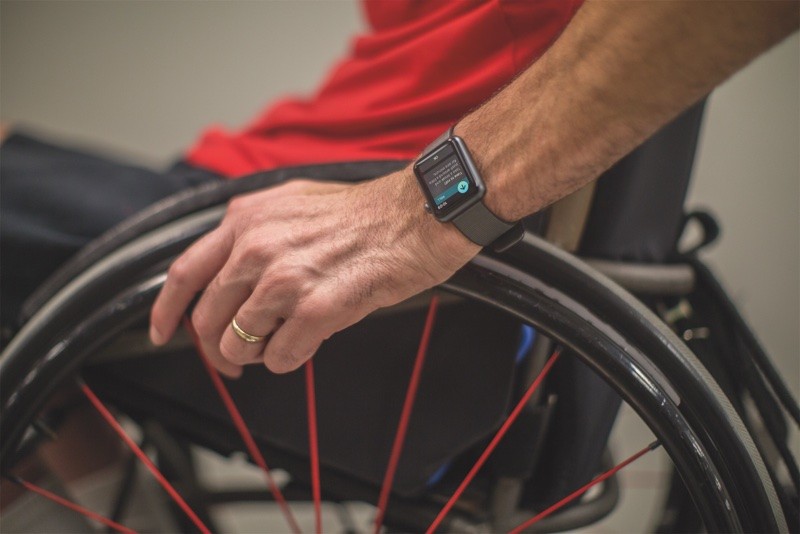
Apple has added a new Wheelchair setting to the Apple Watch in watchOS 3, allowing its activity options to be customized for wheelchair users.
watchoswheelchair
Wheelchair pushes now contribute to all-day calorie goals, there are new wheelchair-specific workouts, and the "time to stand" reminders transform into "time to roll" reminders when the wheelchair setting is activated.

New Apps and App Improvements

New in watchOS 3 are Reminders and Find My Friends app, both of which mirror capabilities found on the iPhone. Find My Friends, when used as a "favorite" app, can offer up-to-date information on the whereabouts of friends and family, while Reminders offers a quick look at to-do lists.
With Glances being replaced by the Dock, there's a new Heart Rate app on the Apple Watch to replace the Heart Rate Glance. Heart Rate is the only Glance that didn't previously also have an accompanying app.

BREATHE

Completely new to the Apple Watch is a dedicated Breathe app, which is designed for relaxation and stress relief. Breathe guides users through deep breathing techniques, with either on-screen visuals or haptic taps.
According to Apple fitness guru Jay Blahnik, Breathe has been designed to make it easy for Apple Watch wearers to incorporate meditation and breathing exercises into their daily routines.
Breathing exercises can be done for one (7 breaths) to five minutes (35 breaths), and while Breathe can be accessed through the Breathe app, the Apple Watch also offers optional "Breathe" reminders, much like stand reminders. Breathe reminders, if activated, are delivered every four hours.

MESSAGES

In Messages, a redesign makes it quicker to reply to incoming texts and iMessages. There's no need to tap "Reply" when a message is received - the options are already listed at the bottom of the notification.
There's also new "Scribble" feature for replying to messages. With Scribble, you can spell out your response on the Apple Watch display with your finger, writing the letters on top of each other. Scribble supports both Chinese and English.

HOME

Apple introduced a new "Home" app in iOS 10 to give users a central location for controlling all of their HomeKit-enabled devices, and there's also a Home app for the Apple Watch. With Home, there are quick-access controls for doing things like controlling the lights or adjusting the thermostat.

Other Features

UNLOCK MACS

Mac owners can now use an authenticated Apple Watch to unlock their Macs whenever they are nearby. Unlocking works through proximity, much like the Apple Watch unlocks when an iPhone is unlocked.
When near a password protected Mac, the Apple Watch is used to bypass the password for quicker entry. This feature requires a 2013 or later Mac and works with all Apple Watch models.

APPLE PAY

Apple Pay is now available within apps on the Apple Watch, so purchases can be made in-app directly on the watch itself. Developers are also able to build Apple Pay into their Apple Watch apps.

NEW DEVELOPER APIS

Developers have access to a lot more tools in watchOS 3, resulting in apps that can do more than ever. watchOS 3 includes support for the Digital Crown, touch events, speaker audio, in-line video, SpriteKit, SceneKit, Game Center for turn-by-turn gaming, and CloudKit for data storage across devices.

watchOS 3 Tidbits

Camera app - The Digital Crown now allows users to control the iPhone's digital zooming capabilities for digital zooming.
Disable Screenshots - There's now an option to disable screenshots when pressing the Digital Crown and the Side Button simultaneously.
Apple_Watch_enable_screenshots
Find My Apple Watch - The Apple Watch's location is now available using the Find My iPhone app.
Find_My_iPhone_Apple_Watch
Siri - Siri has an updated interface in watchOS 3. A haptic tap is now received when Siri has stopped listening to a request instead of when Siri begin listening, and Siri lets users know information is being sought through a "Hang on..." or "Hold on..." message if a request takes more than a second or two.
Notifications - Dismissing a notification now returns a user to the watch face instead of the Notification Center.

watchOS 3 How Tos

Release Date

watchOS 3 was officially released on Tuesday, September 13, 2016. It is a free download available for all Apple Watch models, including the original Apple Watch, Series 1, and Series 2.


#christmas offer milford mall,# new year offer milford mall, #apple, iPhone, iphonerepair, rasvindersingh, rasvinderinauckland, rasvinder, rasvinder021, auckland, hashtag, iOS, iPadPod, crackescreen, crackscreenrepair, macbookrepair, iPhone5unlock, iPhone5sunlock, iPhone6unlock, iPhone6Sunlock, #iPhone6SPlusunlock, networkunlock, IMEIunlock, VodafoneAustralia, New Zealand, iPadAir2, iPadrepair, iPadProrepair, iPadAirrepair, queenstreet, queenstreetrepair, 0211520735, 0212491313, 0211415515, 0274964242,iphone7, facebook, instagram, snapchat, jobvacancyNZ, jobvacancyAuckland, liquiddamagerepair, insurancereport, insurancedamagereport, Manukaurepair, cityrepair, techxperts, ifixyour, ifixphone, rasvinder, iphonerepairtools, LCD, iphoneparts, mobilephonerepair, #auckland, aucklanddesign, logodesign, queenstreetshopping, aucklandshopping, cbdshopping, ipadprorepair, samsungrepair, GalaxyS5repair, GalaxyS6repair, GalaxyS7repair, iPhone7release, iPhone7unlock, 0211415515, aucklanduniversity, vodafonerepair, latestmovies, warrantyrepair, sparkiPhone, indianstudents, stoleniphonecheck, blacklisted, blaclistediPhone, facebook, onlineauction, cheapiPhone, snapchat, instagrampictures, freemoney, socialmedia, googleplus, google+, googlesearch, trending, iosapps, aotea square, event cinema, imax, burger king, strabucks, cases, covers, batteries, samsung, sony, xperia, huawei, lg, htc, supa cheap, mobile repair, smartphones, computer, laptops, motherboard, screen replacement, screen damage, glass replacement, liquid damage, network lock, milford countdown, muffin break milford mall, tank milford mall,flight centre milfords mall, asb milford mall, bnz bank milford mall,countdown special offer christmas and new year,  the warehouse milford mall special deals christmas, Dreaming of christmas milford mall, spark milford mall, #shopping at copuntdown.